How to Make a Perfect Circle in Minecraft

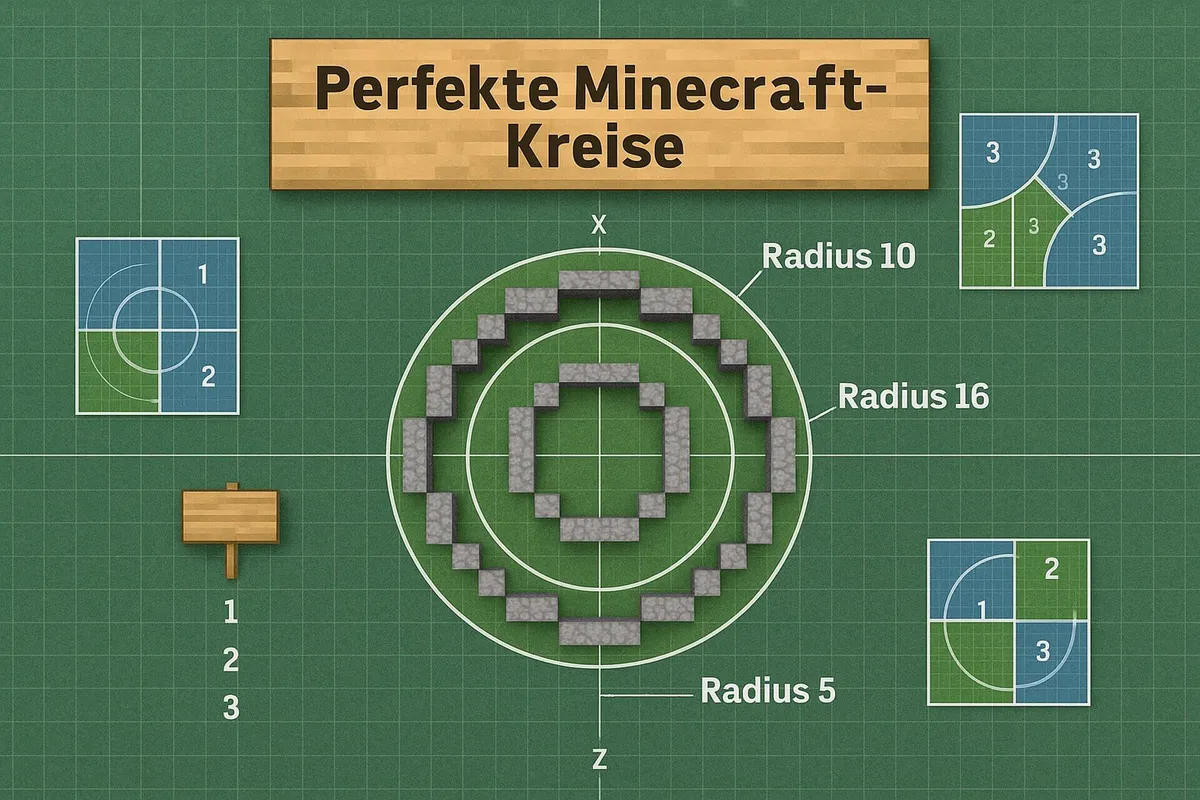
In Minecraft everything is made of cubes – and yet you can build round towers, wells, arenas and domes. The trick is to place the blocks in a fixed pattern that looks like a circle from a distance. In this guide you’ll get ready-made block patterns for the most common sizes, learn how to plan any circle with a circle generator, and see which WorldEdit commands build circles and spheres in seconds.
The by-hand method works in every version and the same way in Java and Bedrock – including the current versions, Java 26.3 and Bedrock 26.50 (as of October 2026).
How the pixel circle method works
A circle in Minecraft is like a circle in an old pixel video game: every square is either full or empty. To make the result look round, each square is checked to see whether its center lies inside the imaginary circle. The easiest way to build such a circle is row by row:
- Choose a diameter. Pick an odd number (7, 9, 11 …) so the circle has a center block and is the same on every side.
- Lay the center line. Lay a straight row as long as the diameter, for example 9 blocks. The middle block is the center of the circle.
- Place the rows. Using the table below, place each row centered above and below the center line. If a row is 7 blocks wide, it has one block less on each side than the 9-block row.
- Keep only the edge. If you want a ring (for tower walls or the rim of a well), only place the outermost blocks of each row at the end – or build it first with a cheap block like dirt, place the edge in your chosen material and then remove the filling.
- Build upward. For a round tower, simply stack the ring layer by layer.
Tip: count each row from the center line, not from the edge. That way nothing slips out of place, even if you miscount once.
Table: block patterns for common diameters
The numbers show how many blocks wide each row of a filled circle is, from top to bottom. Every row is centered. The right-hand column shows how many blocks you need for a ring (just the edge).
| Diameter | Row widths from top to bottom | Blocks for the ring |
|---|---|---|
| 5 | 3 – 5 – 5 – 5 – 3 | 12 |
| 7 | 3 – 5 – 7 – 7 – 7 – 5 – 3 | 16 |
| 9 | 5 – 7 – 9 – 9 – 9 – 9 – 9 – 7 – 5 | 24 |
| 11 | 5 – 7 – 9 – 11 – 11 – 11 – 11 – 11 – 9 – 7 – 5 | 28 |
| 13 | 5 – 9 – 11 – 11 – 13 – 13 – 13 – 13 – 13 – 11 – 11 – 9 – 5 | 36 |
| 15 | 5 – 9 – 11 – 13 – 13 – 15 – 15 – 15 – 15 – 15 – 13 – 13 – 11 – 9 – 5 | 40 |
| 21 | 7 – 11 – 13 – 15 – 17 – 19 – 19 – 21 (7×) – 19 – 19 – 17 – 15 – 13 – 11 – 7 | 56 |
| 25 | 7 – 11 – 15 – 17 – 19 – 21 – 21 – 23 – 23 – 25 (7×) – 23 – 23 – 21 – 21 – 19 – 17 – 15 – 11 – 7 | 68 |
“21 (7×)” means the 21-block row appears seven times in a row. The values are calculated with the center-point rule and double-checked row by row. Some circle generators calculate slightly differently (for example with a “thin” or “thick” line) and so differ by one block in a few places – both versions look round in the game.
This is what the ring with a diameter of 9 blocks looks like from above (# = block, . = empty):
..#####..
.#.....#.
#.......#
#.......#
#.......#
#.......#
#.......#
.#.....#.
..#####..
And this is the ring with a diameter of 13 blocks:
....#####....
..##.....##..
.#.........#.
.#.........#.
#...........#
#...........#
#...........#
#...........#
#...........#
.#.........#.
.#.........#.
..##.....##..
....#####....
As you can see, from this size on the edge is made of little “steps” (5 straight, then 2, then 1 and 1 diagonally). The bigger the circle, the finer the steps and the rounder it looks.
Circle generators: plan any size
If you need a size that isn’t in the table, or an ellipse, a circle generator helps. You enter the width and height in blocks and get a grid that you copy square by square.
- Pixel Circle Generator by Donat Studios: the classic for circles and ellipses. Enter width and height, choose a “thin” or “thick” edge, done. It runs in the browser, on tablets too.
- Plotz: shows spheres, domes, cylinders and other 3D shapes layer by layer. Ideal if you want to build a dome or a sphere by hand.
How to build a sphere by hand: a sphere is a stack of circles that get bigger toward the middle and then smaller again. In Plotz, choose the sphere, set the diameter and work through the layers from bottom to top. For a dome, build only the top half.
Building circles and spheres with WorldEdit commands
WorldEdit is a building tool for Java Edition. It’s available as a server plugin (Paper, Spigot) and as a mod for Fabric and NeoForge, including in singleplayer. According to Modrinth it currently supports Minecraft 26.3 as well. In singleplayer, cheats must be enabled. WorldEdit isn’t available for Bedrock Edition.
The commands according to the official WorldEdit documentation:
| Command | What it builds | Example |
|---|---|---|
//cyl <block> <radius> [height] | filled cylinder / circle | //cyl stone 5 1 – flat stone circle |
//hcyl <block> <radius> [height] | hollow cylinder / ring | //hcyl stone_bricks 6 10 – round tower, 10 blocks high |
//cyl <block> <radiusEW>,<radiusNS> [height] | ellipse | //cyl grass_block 8,4 1 – oval flower bed |
//sphere <block> <radius> | filled sphere | //sphere glass 6 |
//hsphere <block> <radius> | hollow sphere | //hsphere glass 10 – glass dome |
//sphere -r <block> <radius> | sphere that sits at your level | //hsphere -r glass 8 |
//undo / //redo | undo / redo the last step | – |
Good to know:
- Cylinders are created at your position and grow upward. So stand exactly on the center you want.
- By default, spheres are centered on the block above the one you’re standing on – so the lower half is in the ground. With
-rthe sphere is raised by its radius and sits on the surface. - The radius is half the diameter. A circle made with
//cyl stone 5ends up 11 blocks wide (5 left, 5 right, 1 center block). - Instead of a single block you can also give a pattern, for example
50%stone,50%cobblestonefor a mixed wall. - Large shapes can briefly slow the server down. It’s better to start small and use
//undoto take back anything that doesn’t fit.
How to get plugins onto your server is explained in our article on plugins and mods for your Minecraft server. What each edition can do is covered in our comparison Minecraft Bedrock vs. Java.
Circle generator or WorldEdit – which suits you?
| By hand with table / generator | WorldEdit | |
|---|---|---|
| Game mode | Survival and Creative | mainly Creative (cheats needed) |
| Edition | Java and Bedrock | Java only |
| Speed | slow, block by block | seconds |
| Need your own blocks | yes (Survival) | no |
| Learning effect | high: counting, symmetry, planning | low |
In Survival mode or on Bedrock there’s no way around building by hand – but with the table or a generator as a template it works reliably. WorldEdit is worth it for big Creative projects such as arenas, domes or entire city walls.
A tip for parents
Circles in Minecraft are sneaky math practice: kids count rows, pay attention to symmetry and notice that a bigger circle looks “rounder” than a small one. A circle generator on a tablet next to the screen makes a good template. WorldEdit requires cheats or your own server – that’s something to decide together.
Frequently asked questions
How do you build a circle in Minecraft?
Build the circle row by row following a block pattern: for a circle 9 blocks across, the rows are 5, 7, 9, 9, 9, 9, 9, 7 and 5 blocks wide, each centered. For a ring, only place the outer blocks. You can get the pattern from a circle generator or from the table in this article.
What is the best diameter for a circle in Minecraft?
Odd diameters such as 7, 9, 11 or 13 are the most practical, because the circle then has a center block. A circle only really looks round from about 9 to 11 blocks across; smaller ones look more like rounded squares.
What is a Minecraft circle generator?
A circle generator is a website that converts a circle or ellipse into a grid. You enter the width and height and get a picture in which every square is one block. Well-known ones are the Pixel Circle Generator by Donat Studios and Plotz for spheres and other 3D shapes.
How do you make a circle with WorldEdit?
//cyl <block> <radius> [height] creates a filled cylinder at your position, and //hcyl creates a hollow ring. For example, //cyl stone 5 1 makes a flat stone circle with radius 5. You build spheres with //sphere, or hollow ones with //hsphere.
Is WorldEdit available for Bedrock?
No. WorldEdit only exists for Java Edition, as a server plugin (Paper, Spigot) or as a mod for Fabric and NeoForge. In Bedrock Edition you build circles by hand, using a circle generator as a template.
Conclusion
There’s no such thing as a perfect circle in Minecraft – but there is one that looks perfectly round. For small and medium circles the table above is all you need, a circle generator covers every other size, and on Java servers WorldEdit builds cylinders and spheres in seconds. Start with a 9- or 11-block circle: it’s quick to build and already looks properly round.
More on this topic #Building Guide
See all

How to Build a Simple Minecraft House
Build a Minecraft starter house: a material list with amounts, a 7×7 layout in 10 steps, first-night survival tips and variants in stone or with a gable roof.

How to Build a Secret Piston Door in Minecraft
Build a secret 2×2 piston door in Minecraft: materials list with 12 sticky pistons, building steps and the redstone explained simply. For Java Edition, incl. 26.3.